Private File Storage with S3
Apart from hosting the React Frontend application statically, the Rookwork project requires a secure, private cloud storage solution to store project-related document attachments, user-uploaded files, and profile avatars.
We use Amazon S3 combined with Presigned URLs to ensure all user files are stored securely.
Step 1: Create a Private Amazon S3 Bucket
- Navigate to the Amazon S3 service on the AWS Management Console.
- Click Create bucket.
- Configure settings:
- Bucket name: Enter a globally unique name (e.g.,
rookwork-attachments-bucket). - AWS Region: Select the same region where your EC2 and RDS instances reside (e.g.,
ap-southeast-1Singapore). - Block Public Access settings: Check Block all public access (It is mandatory to block all public access to prevent project attachments and member avatars from being leaked to the public internet).
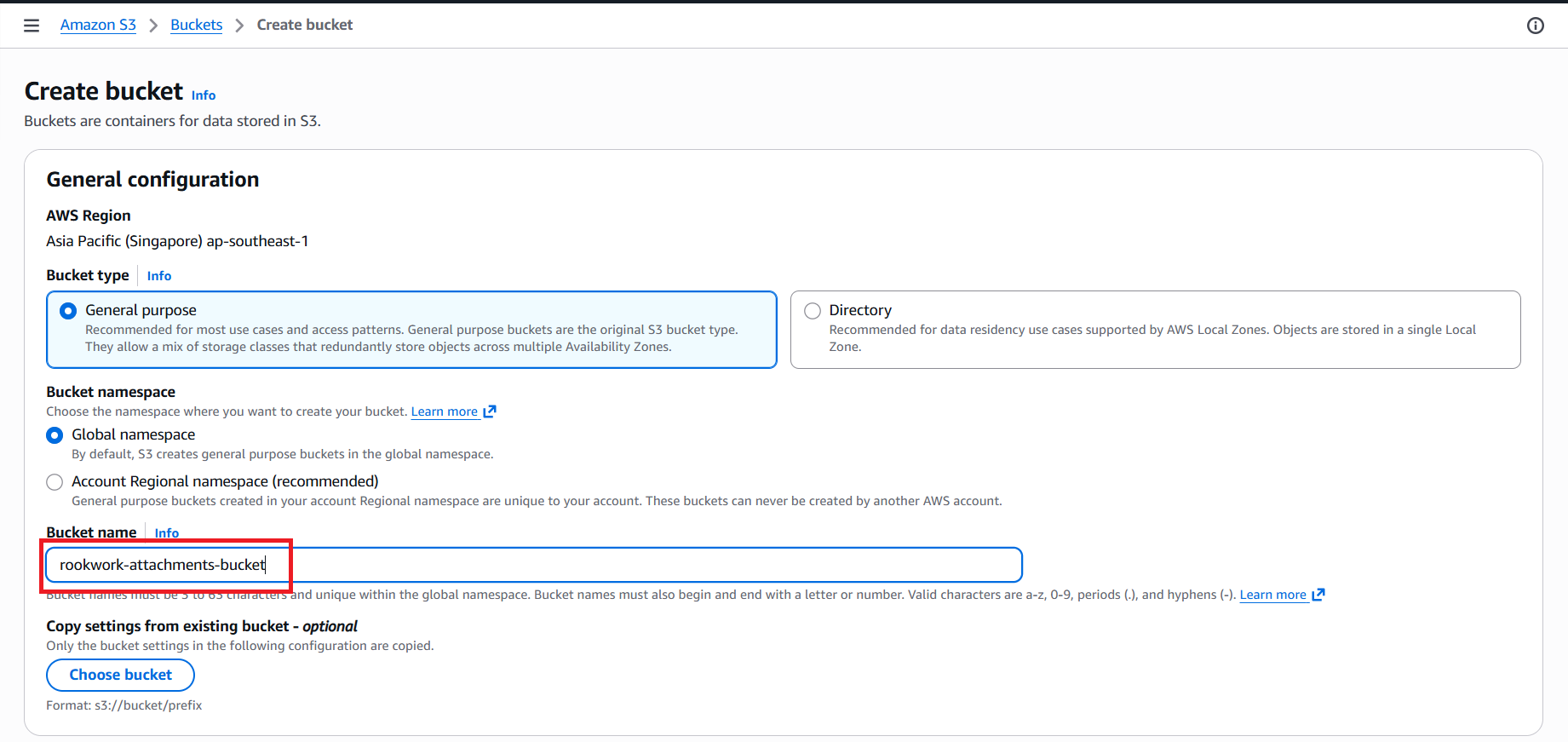
- Bucket name: Enter a globally unique name (e.g.,
- Keep the remaining settings at default and click Create bucket.
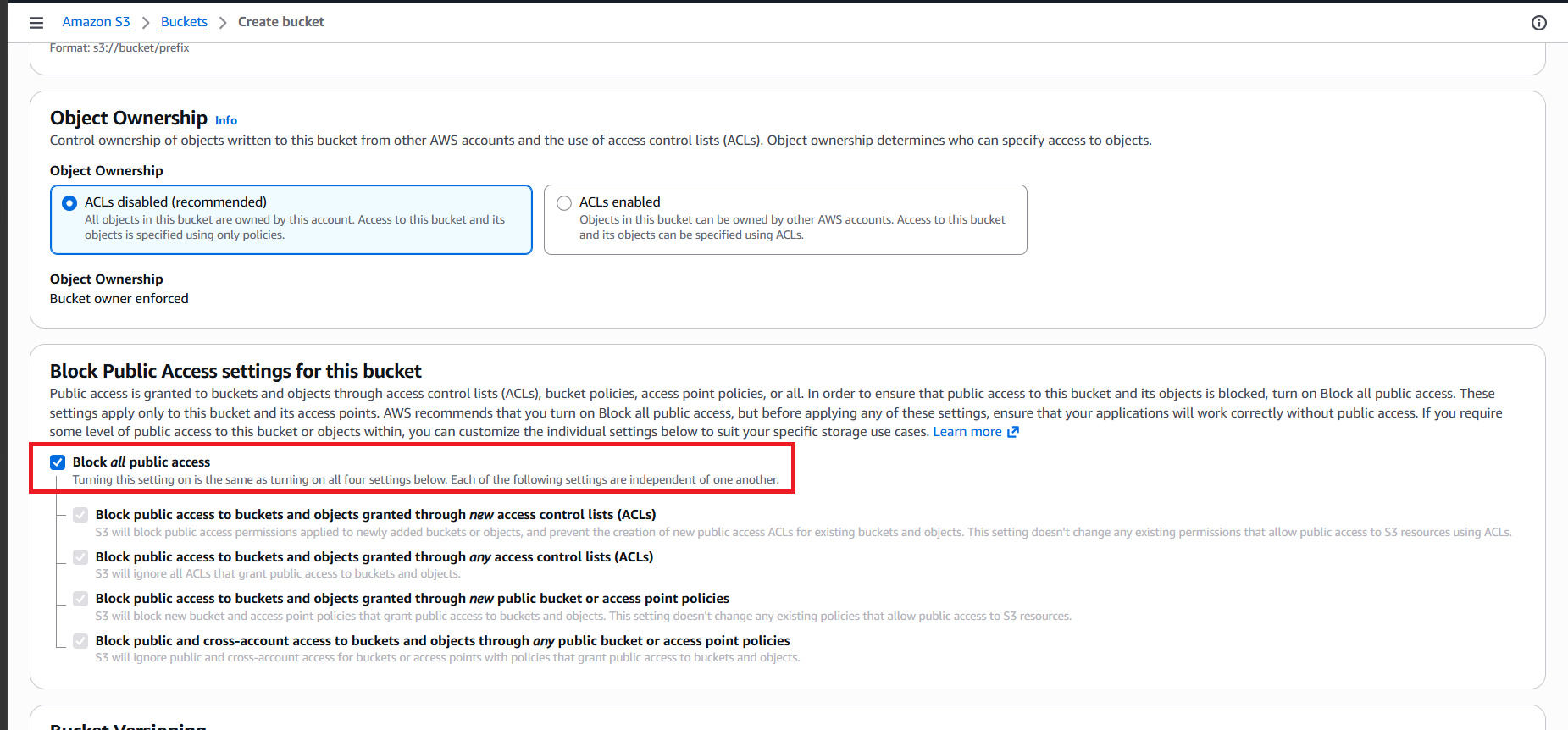
Step 2: Configure Spring Boot Backend
In the Spring Boot backend source code (rookwork-backend-sb), load Spring Cloud AWS S3 configurations using system environment variables (inside the .env file or set as environment variables on the production EC2 server):
# AWS S3 Production Configuration
spring.cloud.aws.s3.enabled=true
spring.cloud.aws.region.static=${AWS_REGION:ap-southeast-1}
spring.cloud.aws.credentials.access-key=${AWS_S3_ACCESS_KEY_ID}
spring.cloud.aws.credentials.secret-key=${AWS_S3_SECRET_ACCESS_KEY}
aws.s3.bucket-name=${AWS_S3_BUCKET:rookwork-attachments-bucket}
Step 3: Implement S3 Service in Java using AWS SDK v2
In the Rookwork backend application (rookwork-backend-sb), we utilize the S3Template class (from the Spring Cloud AWS library) to upload and delete files, alongside the S3Presigner class to generate temporary pre-signed URLs (valid for 15 minutes) for secure access and download of private objects:
package com.example.rookwork_backend_sb.services;

import io.awspring.cloud.s3.S3Template;
import lombok.RequiredArgsConstructor;
import org.springframework.beans.factory.annotation.Value;
import org.springframework.stereotype.Service;
import org.springframework.web.multipart.MultipartFile;
import software.amazon.awssdk.services.s3.model.GetObjectRequest;
import software.amazon.awssdk.services.s3.presigner.S3Presigner;
import software.amazon.awssdk.services.s3.presigner.model.GetObjectPresignRequest;
import software.amazon.awssdk.services.s3.presigner.model.PresignedGetObjectRequest;

import java.io.IOException;
import java.io.InputStream;
import java.time.Duration;
import java.util.UUID;

@Service
@RequiredArgsConstructor
public class S3Service {

    private final S3Template s3Template;
    private final S3Presigner s3Presigner;

    @Value("${aws.s3.bucket-name}")
    private String bucketName;

    /**
     * Uploads a file to AWS S3 and returns the generated stored name.
     */
    public String uploadFile(MultipartFile file, UUID projectId, UUID issueId) throws IOException {
        String fileExtension = getFileExtension(file.getOriginalFilename());

        // Generate random unique name
        String fileUuid = UUID.randomUUID().toString();
        // Construct directory structure key: projects/{projectId}/issues/{issueId}/{uuid}{ext}
        String storedName = String.format("projects/%s/issues/%s/%s%s",
                projectId,
                issueId,
                fileUuid,
                fileExtension);

        try (InputStream inputStream = file.getInputStream()) {
            s3Template.upload(bucketName, storedName, inputStream);
        }
        return storedName;
    }

    /**
     * Deletes a file from AWS S3.
     */
    public void deleteFile(String storedName) {
        s3Template.deleteObject(bucketName, storedName);
    }

    /**
     * Generates a temporary Presigned URL for viewing/downloading files.
     * Valid for 15 minutes.
     */
    public String generatePresignedUrl(String storedName) {
        if (storedName == null || storedName.isEmpty()) {
            return null;
        }

        GetObjectRequest getObjectRequest = GetObjectRequest.builder()
                .bucket(bucketName)
                .key(storedName)
                .build();

        GetObjectPresignRequest getObjectPresignRequest = GetObjectPresignRequest.builder()
                .signatureDuration(Duration.ofMinutes(15))
                .getObjectRequest(getObjectRequest)
                .build();

        PresignedGetObjectRequest presignedGetObjectRequest = s3Presigner.presignGetObject(getObjectPresignRequest);
        return presignedGetObjectRequest.url().toString();
    }

    /**
     * Uploads a user avatar to S3 under the "avatar" directory.
     */
    public String uploadAvatar(MultipartFile file, UUID userId) throws IOException {
        String fileExtension = getFileExtension(file.getOriginalFilename());

        // Key format: avatar/{userId}/{fileUuid}{ext}
        String fileUuid = UUID.randomUUID().toString();
        String storedName = String.format("avatar/%s/%s%s", userId.toString(), fileUuid, fileExtension);

        try (InputStream inputStream = file.getInputStream()) {
            s3Template.upload(bucketName, storedName, inputStream);
        }
        return storedName;
    }

    /**
     * Helper to get presigned URL for avatar if it is stored on S3.
     * If not stored on S3 (e.g. Google URL or null), returns the original value.
     */
    public String getAvatarUrl(String picture) {
        if (picture != null && picture.startsWith("avatar/")) {
            return generatePresignedUrl(picture);
        }
        return picture;
    }

    private String getFileExtension(String filename) {
        if (filename != null && filename.contains(".")) {
            return filename.substring(filename.lastIndexOf("."));
        }
        return "";
    }
}
After configuring private file storage, proceed to 5.7.5. Email Integration with Amazon SES to set up the email notifications and OTP service.